The manual way
Twenty minutes per seed, and you still miss some
Sellers retype the seed with a letter after it — yoga mat a, yoga mat b, yoga mat c — and copy what comes back. It works. It also does not scale past a couple of seeds a day.
Chrome extension · Amazon keyword research
One click on the Amazon search bar turns the ten autocomplete suggestions into 114–117 deduplicated buyer search terms, each tagged with the path that produced it, ready to export as CSV. Expanding is free, unmetered, and needs no account.
Add to Chrome — free See what's free
Works on 23 Amazon marketplaces · One permission (storage) · The words you type never leave your browser
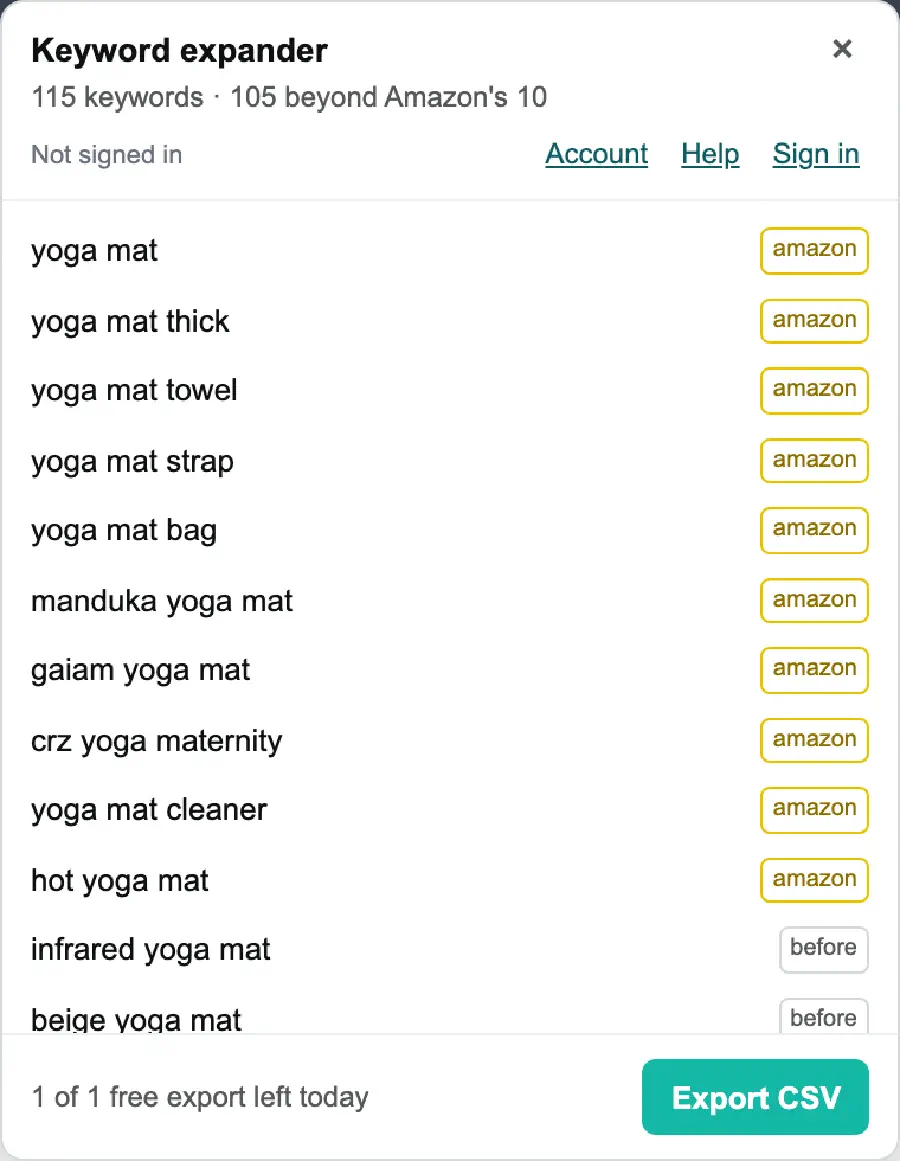
storage. No downloads permission: the CSV goes through Chrome's own save actionEvidence
These are captures of the shipping build, run on the seed yoga mat. The counts in the header are what the extension returned, not a marketing number.

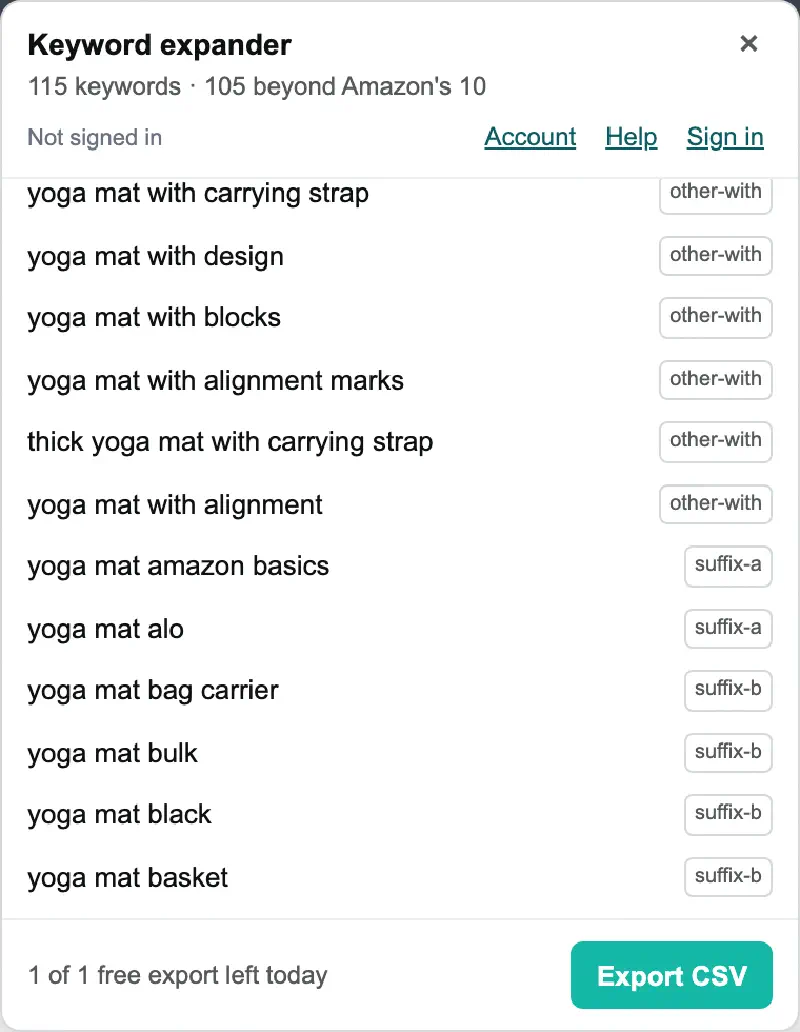
suffix-a, suffix-b, other-with — the manual trick of retyping the seed with a letter after it, automated and labelled.A live run on yoga mat returned 110 terms, 100 of them beyond Amazon's native ten. Broad seeds return more than narrow ones — the number moves with the seed, and we would rather quote the range than the best case.
Why 10 is the number that hurts
Amazon's autocomplete is one of the few keyword signals that comes straight from buyers — those phrases exist because people typed them. The problem is the cap, and the workaround is tedious.
The manual way
Sellers retype the seed with a letter after it — yoga mat a, yoga mat b, yoga mat c — and copy what comes back. It works. It also does not scale past a couple of seeds a day.
The paths
Baseline, before, after, and the connectors for / and / with, then the letters a–h. The letter rotation alone produced 240 of 300 terms in testing.
Measured, not guessed
Every path in that list was measured before it shipped. A feature list that includes dead paths looks bigger and performs worse.
When it breaks
Suggestion endpoints change without notice. When the request path stops returning results, the extension falls back to reading the dropdown on the page and tells you it did — fewer terms, and you know why.
What it deliberately does not do: search volume. There is no honest way to derive it from autocomplete, and a made-up number is worse than a missing one. The reasoning is on the CSV export page.
In use
Nothing to configure and nothing to sign into. Install it, then it is one extra button on a page you were already on.
From the Chrome Web Store. No account, no email.
On amazon.com, .co.uk, .de, .co.jp or any of the other 19 marketplaces.
The panel opens next to the search bar with the full deduplicated list.
One click writes a UTF-8 CSV named after your seed and the date.
The CSV has three columns — keyword, variant, source — and opens cleanly in Excel and Google Sheets. Full column reference on the CSV export page.
Pricing
The paywall sits on the export only. Expanding keywords is free and is never counted, metered or throttled — that is a deliberate design decision, not an introductory offer.
Free
$0 no account
Unlimited, unmetered keyword expansion, plus one CSV export a day.
Pro
$39 per year · or $5.99/month
Everything in Free, with unlimited CSV exports.
| Free | Pro | |
|---|---|---|
| Keyword expansion | Unlimited, unmetered | Unlimited, unmetered |
| Deduplication against Amazon's native 10 | Yes | Yes |
| Path tagging and grouping | Yes | Yes |
| Automatic fallback when the endpoint fails | Yes | Yes |
| CSV export | 1 per day | Unlimited |
| Account required | No | Google sign-in, for billing only |
| Price | $0 | $5.99/month or $39/year |
The free daily export resets at UTC midnight rather than your local midnight — worth knowing before you plan a session around it.
Before you install
Including the ones where the answer is no.
Not for the free tier. Expanding keywords and the one free CSV export per day work with no registration, no email and no sign-in. You sign in with Google only to buy Pro or restore it on another computer.
Yes — 23 Amazon marketplaces, and the extension uses the one whose site you are on. amazon.cn is not supported: Amazon's suggestion service returns nothing for it, so listing it would be a promise we could not keep.
No, deliberately. Autocomplete does not carry volume, and inventing a number would make the whole list untrustworthy. Use it for phrasing and coverage, then check volume in whatever tool you already pay for.
It depends on the seed. A first-party probe on 2026-08-11 got 114–117 deduplicated terms per seed; a live run on yoga mat returned 110, of which 100 were beyond Amazon's native ten. Broad seeds return more than narrow ones.
No. Expansion is free permanently and unmetered. The free tier also includes one CSV export per day.
The search term goes from your browser straight to Amazon and is used only to build that one request. It is not stored, not logged and never uploaded to us — and the expanded keywords never pass through our servers either.
Install it, type the seed you were going to type anyway, and read the other hundred phrases buyers actually use.
Add to Chrome — free CSV column reference
For Amazon sellers drafting listings and PPC seed lists, KDP and Merch sellers hunting long-tail phrasing, and agencies who need a defensible list in a spreadsheet in under a minute.