If you’ve ever tried to save Amazon listing images manually (right-click → save… again and again), you already know the pain: variants multiply, galleries get messy, and sharing “the exact assets we used” with your designer or teammate turns into a time sink.
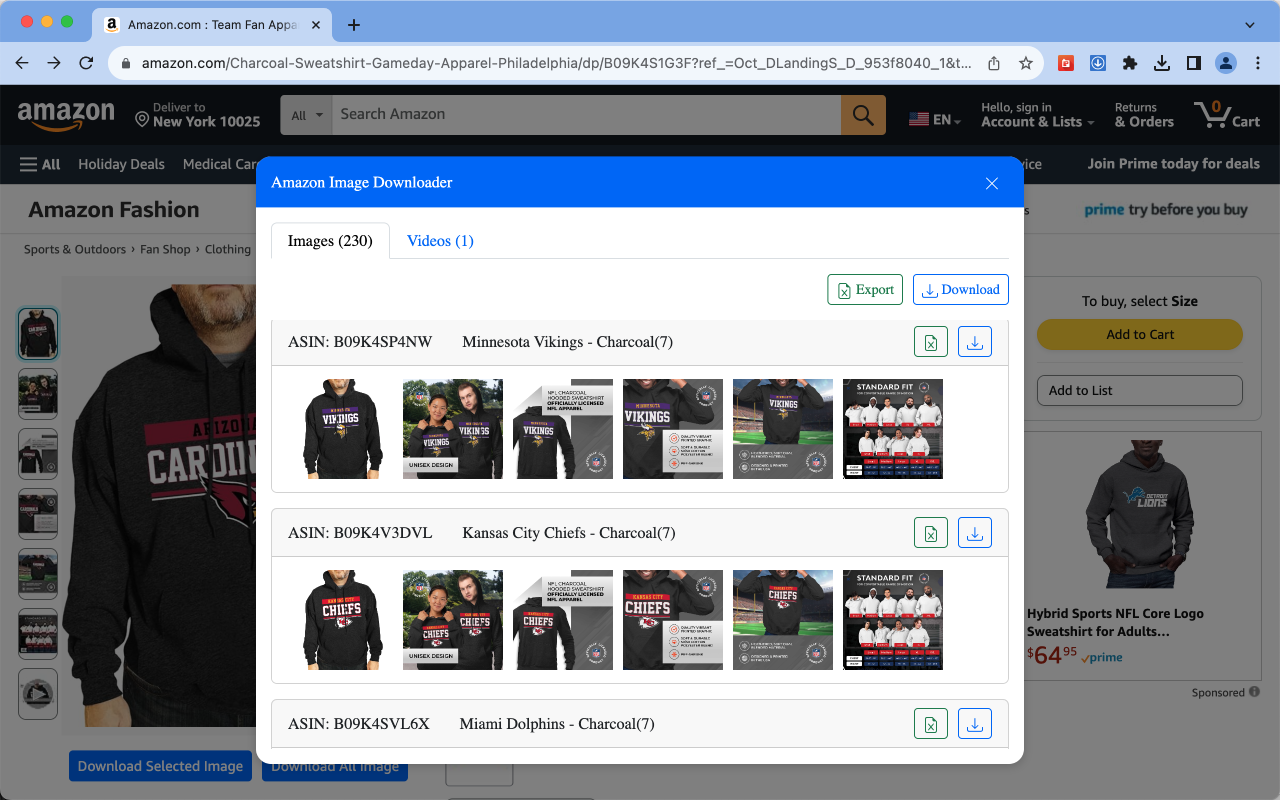
Amazon Image Downloader |CSV & Image、Video is a Chrome extension designed to turn that whole workflow into a few clicks—download the assets you need, keep them organized, and export URLs for tracking or collaboration.
What this extension does (in plain English)
According to its Chrome Web Store listing, the extension can help you:
- Download Amazon listing images including main images, variant images, gallery images, and description images
- Download Amazon product videos (when available on the listing)
- Save downloads into subfolders (so your assets stay organized)
- Export image and video URLs to CSV (one click)
- Deduplicate images automatically (avoid repeats)
- Download by color and export URLs by color (useful for color-variant listings)
- Save everything as a ZIP for easy sharing and archiving
- Work across 15+ Amazon sites (as claimed by the listing)
Tip: Think of it as a “listing asset pack generator”—images/videos + a CSV manifest you can hand off to someone else.
Who it’s for
Amazon sellers & operators
- Competitor analysis (how they structure gallery images, angles, infographics)
- Listing refresh projects (collect references + build a reusable asset library)
- Creative iteration for ads (grab assets, organize them fast, hand off to design)
Designers & creative teams
- Avoid low-quality screenshots
- Get all variants and detail images without asking the operator to “send the rest”
- Receive a tidy ZIP + CSV so you can work immediately
Researchers, agencies, and content creators
- Build product research folders quickly
- Keep a “source of truth” list of URLs for documentation, briefs, or internal tools
Real-world use cases (how people actually use it)
1) “Competitor listing asset pack” in 60 seconds
- Open a competitor product page
- Download main + variants + description images
- Save as ZIP into a folder named like
ASIN_US_YYYY-MM-DD - Export CSV URLs to keep a traceable reference list
Result: a clean, shareable package you can reuse later (design, copy, research, audit).
2) Variant-heavy listings (colors/sizes) without the chaos
For listings with many color variants, grabbing assets manually is a nightmare.
This extension’s “download/export by color” approach (as described in the listing) helps you keep each color variant’s images grouped.
3) Collaboration handoff: operator → designer
Instead of sending random screenshots, you send:
- a ZIP (assets)
- a CSV (links/manifest)
The designer knows exactly what was pulled and can verify sources later.
How to use it (quick start)
- Install the extension from the Chrome Web Store
- Open an Amazon product detail page (the listing you want)
- Click the extension icon and choose what you need:
- Download images (main / variants / description / gallery)
- Download video (if present)
- Export CSV (image URLs / video URLs)
- ZIP packaging, subfolder organization, deduplicate, color filtering
Best practices for staying organized
- Use a consistent folder naming convention
Example:B0XXXXXXX_US_2026-01-15/ - Store both the ZIP and CSV
ZIP is for production use; CSV is for traceability and automation - Keep “source page URL” in your notes
Add the listing URL to your internal doc/Notion/task so anyone can validate later
Privacy notes (what the developer claims)
The Chrome Web Store page includes privacy statements indicating the developer does not collect or use your data, and also states that data you process stays on your local computer and does not pass through their servers.
Always review the listing and privacy policy yourself before using any extension in a production workflow.
FAQ
Does it download high-resolution images?
The listing states downloads are HD resources, meaning you should get higher-quality assets than typical screenshots.
Can I export links instead of downloading files?
Yes—its listing mentions one-click CSV export for photos and videos, which is helpful for cataloging, auditing, or automation.
Can it handle variants (like colors)?
The listing describes downloading variant images and includes download/export by color options.
Does it work on all Amazon marketplaces?
The listing claims it works across 15+ Amazon sites. Availability may vary by listing layout and region.
Final thoughts
If your job involves Amazon listing assets—whether you’re a seller, operator, designer, or agency—this extension is built to remove the repetitive parts: collect, organize, deduplicate, package, and export.
Try it here:
https://chromewebstore.google.com/detail/amazon-image-downloader-c/hpkgjghffomgkkebbdbikpgckenelpke