Sponsored Brands image specifications depend on the asset and ad format: Amazon’s current Collections documentation specifies a logo of at least 400 × 400 pixels, no larger than 1MB, in PNG or JPG. The older Product Collection format documents custom images of at least 1200 × 628 pixels, no larger than 5MB, in PNG or JPG—but the newer Collections format does not support custom or lifestyle images. Product images belong to the advertised ASINs and follow listing-image requirements rather than either upload specification.
Documentation checked November 10, 2026. This is a public-documentation guide, not an advertising-account upload test. Start by identifying the format in your campaign: a technically correct file for an older format can still be the wrong deliverable for a newer one.
Sponsored Brands image specifications by asset
The following table separates actual upload limits from catalog-image standards. The logo and legacy custom-image values come from Amazon Ads’ Product Collection documentation and unified pre-moderation guide, checked November 10, 2026. Amazon’s Collections guide, checked the same day, independently confirms the logo limits and excludes custom imagery from Collections.
| Asset and scope | Pixel dimensions | File size | File format | Where the requirement belongs |
|---|---|---|---|---|
| Brand logo in Collections; also documented for legacy Product Collection | 400 × 400 px or larger | 1MB or smaller | PNG or JPG | Separate brand-logo asset; optional in Collections |
| Custom/lifestyle image in legacy Product Collection | 1200 × 628 px or larger | 5MB or smaller | PNG or JPG | Custom-image asset for that format, not a universal Sponsored Brands requirement |
| Product image attached to an ASIN | 500–10,000 pixels on the longest side | No universal Sponsored Brands upload cap established by the cited listing guide | Listing guide names JPEG, TIFF, PNG and non-animated GIF; ad policy additionally prohibits all GIFs and animations | Catalog/listing image plus ad-specific restrictions, not the logo or custom-image field |
| Custom/lifestyle image in newer Collections | Not applicable | Not applicable | Not applicable | Collections documentation says these images are not supported |
For the product-image row, the source is Amazon’s product photography guide, checked November 10, 2026. It also expresses a preference for images larger than 1,000 pixels on each side to support zoom and for JPEG files. That preference is different from the stated 500–10,000-pixel longest-side range; neither is a replacement custom-image specification.
Keep the table’s scope labels when sending it to a designer. Removing “legacy Product Collection” from the custom-image row would turn an accurate requirement into misleading advice. Likewise, the listing guide’s acceptance of TIFF does not mean TIFF is accepted in a logo field that explicitly calls for PNG or JPG.
Dimensions and file weight are separate checks. A sufficiently large source can still exceed its upload limit, while a small compressed file can still lack enough pixels. Check the actual exported file rather than the dimensions of the design document or the resolution of an embedded photograph.
Identify the ad format before commissioning images
Amazon Ads’ Product Collection API page, checked November 10, 2026, carries a deprecation notice: the Product Collection ad type is scheduled to shut off in January 2027, and the page directs new development toward Collections. The notice concerns that ad type and API workflow; it is not evidence that every account has the same console options today.
In the newer Collections documentation checked on the same date, manual collections let advertisers select 3–10 related products. Automatic collections let Amazon curate products from the catalog. A brand logo is optional, and custom/lifestyle images and videos are not supported for Collections.
This changes the creative brief. For a Collections workflow, prioritize the catalog products and any optional logo. For an existing legacy Product Collection workflow, the wide custom image may still be the relevant asset to inspect. For video, use the separate Sponsored Brands video specifications, not this static-image table.
Record the ad-type label, marketplace, and intended workflow on the brief before production begins. If a request only says “Sponsored Brands banner,” return it for clarification: the phrase does not identify whether the work is a catalog selection, logo upload, legacy custom image, or video asset.
For the wider role of each advertising product, see the Amazon advertising guide. Keep that planning decision separate from file acceptance.
Logo preparation: inspect the mark, not just the square
Amazon’s logo specification, checked November 10, 2026, says the logo must fill the image or have a white or transparent background. Its Sponsored Brands and display ads moderation guide, checked the same day, adds the content distinctions: a logo is not a product photograph, ASIN image, lifestyle image, or combination of logos.
Ask for a clean brand-mark export with readable lettering. Inspect it at a reduced display size as well as at full resolution. A large canvas with a tiny mark in the center is not automatically a useful logo simply because its outer dimensions meet the pixel minimum.
Use this review sequence:
- Confirm that the file contains the intended brand’s logo rather than a photograph of its packaging.
- Check the exported dimensions, format, and file weight against the logo row.
- Inspect the background, edge quality, and amount of empty space around the mark.
- Check that any crop preserves the whole identifying mark and readable brand name.
- Save the approved file version with its corresponding brand and marketplace brief.
A transparent-background export needs a format that actually preserves transparency. PNG can do that; JPG cannot. Both are listed file formats, but choosing JPG does not make a transparent background survive export. Use the white-background option when that better fits the file and mark.
Do not add the campaign headline to the logo file. Amazon’s moderation guide treats the logo and headline as distinct components, and extra promotional copy changes what the asset contains.
Custom images: apply the legacy specification only where supported
For legacy Product Collection, Amazon’s custom-image table checked November 10, 2026, specifies 1200 × 628 pixels or larger, 5MB or smaller, and PNG or JPG. The table also says not to add text, graphics, or logos to the image. Those are explicit technical and content conditions—not a general recommendation to make attractive imagery.
The moderation guide checked the same day describes custom imagery as showing the brand or product in context or a lifestyle setting. It excludes isolated product images on a solid or transparent background, a standalone logo, one of the selected product images, additional text beyond text naturally present in the scene, and letterbox or pillar-box treatment.
For a hypothetical lunch-bag brand, a genuine scene showing the bag beside a packed meal communicates use. Copying a catalog cutout onto a plain canvas communicates a different asset type. Adding an advertising slogan across the scene introduces another issue, even if the exported dimensions are correct.
Preview the actual crop before handing off. Keep the relevant product and the context that explains it inside the intended composition. Enlarging a low-resolution photograph to the minimum dimensions does not restore missing detail; the moderation guide also identifies blurred, distorted, and pixelated images as quality problems.
Do not use this legacy specification as a reason to manufacture a lifestyle image for Collections. The current Collections page explicitly excludes that asset type. When the format changes, update the deliverable list rather than simply recycling the previous campaign’s files.
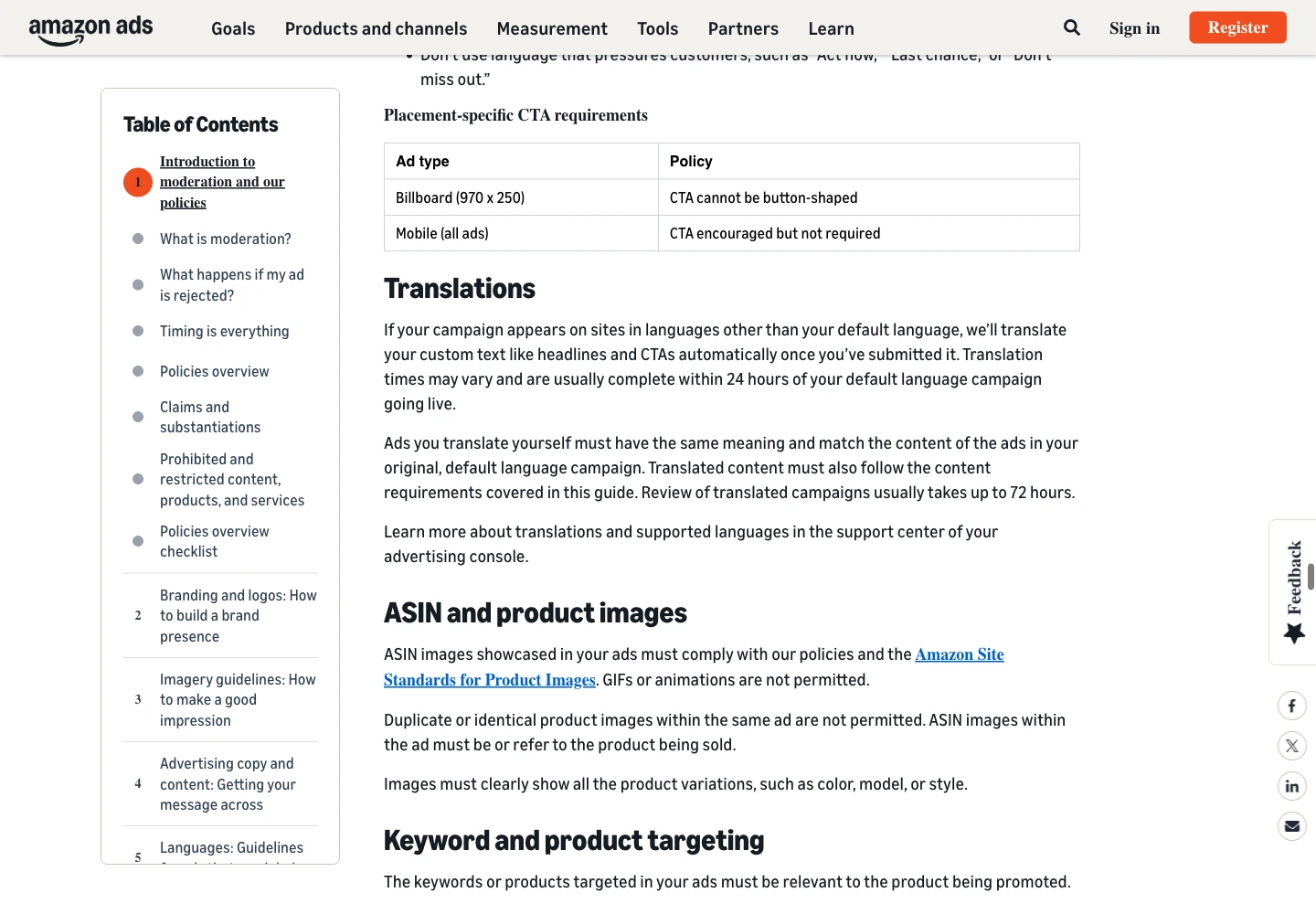
Amazon Ads public moderation guide, captured November 10, 2026. The ASIN and product images section adds advertising restrictions to catalog-image standards. Source: Amazon Ads; not an account upload test.
Product assets: fix the listing source, not a substitute upload
ASIN product imagery is a third lane. Amazon’s moderation guide, checked November 10, 2026, requires both product-image standards and advertising-policy compliance. It prohibits GIFs and animations, including non-animated GIFs, and duplicate or identical product images within the same ad. That is not an instruction to upload every product photograph as a custom image.
Amazon’s product photography guide checked the same day states that listing images must be 500–10,000 pixels on their longest side and lists JPEG, TIFF, PNG, or non-animated GIF. Listing acceptance does not override the ad policy: a non-animated GIF is not an eligible advertising image. The listing guide’s preference for larger-than-1,000-pixel sides for zoom helps source preparation; it does not turn every smaller image in the stated range into a logo or custom-image rejection.
Match each product to the actual advertised variation. Check the color, included accessories, size presentation, and packaging visible in the source image against the product shoppers can purchase. A technically sharp image of another variation creates a different problem from insufficient resolution.
Use a source ledger for the collection:
| Product check | Record for handoff |
|---|---|
| Identity | ASIN and selected variation |
| Source | Current product-detail-page image being reviewed |
| Technical condition | Actual source dimensions and format |
| Representation | Product, included items, and variation match |
| Ownership of next action | Listing-image correction or ad-creative correction |
Keep the original file and the current listing reference together. If a product image needs correction, route that correction through the listing workflow. Sending a replacement photograph to the person holding only the logo brief leaves the underlying catalog issue unresolved.
A creative handoff checklist that catches the right failure
Build the handoff around asset roles rather than a folder of vaguely named images. Each row should carry the ad type, marketplace, asset role, version, source, and the person responsible for the next action.
Before submission, check:
- The requested assets are supported by the exact ad format.
- The logo meets its own dimensions, file weight, format, and content rules.
- A legacy custom image meets its separate dimensions and file-weight limit.
- The custom image does not contain added headline text or a substituted catalog cutout.
- Each advertised ASIN uses the intended product and variation imagery.
- ASIN ad imagery contains no GIFs or animations and no duplicate or identical product images within the same ad.
- Crops keep the important mark or subject visible.
- The final export, not an earlier draft, is the file being supplied.
- The destination and advertised assortment agree with the creative brief.
If a file is rejected, classify the reason before rebuilding it. A size failure calls for a different export. A logo-content failure calls for a different asset. An unsupported custom-image field calls for a format decision. Changing all three at once makes it harder to tell which correction resolved the issue.
Amazon’s unified pre-moderation guide checked November 10, 2026, distinguishes specification and policy violations and says pre-moderation approval does not guarantee final moderation approval. Preserve the returned reason and the submitted version when reviewing a rejection; a previous asset-level result is not the final campaign outcome.
Once the creative package is ready, connect it to the Sponsored Brands budget plan. Asset readiness and budget readiness are different launch dependencies, so give each a clear owner.
Frequently Asked Questions
What size should a Sponsored Brands logo be?
Amazon’s Collections and legacy Product Collection documentation, checked November 10, 2026, specify 400 × 400 pixels or larger, 1MB or smaller, in PNG or JPG. The logo is optional in the newer Collections format.
Is 1200 × 628 the image size for every Sponsored Brands ad?
No. Amazon documents that minimum for the legacy Product Collection custom image, with a 5MB limit and PNG or JPG format. Its newer Collections documentation, checked November 10, 2026, says custom and lifestyle images are not supported.
Can I use a product image as the brand logo?
Amazon’s moderation guide checked November 10, 2026, separates these roles and excludes product and ASIN images from the logo. Keep the registered brand mark, contextual custom imagery, and catalog product images as distinct deliverables.