To reconcile Amazon FBA inventory, fix one reporting period and inventory scope, then bridge the Inventory Ledger’s starting warehouse balance to its ending warehouse balance using the movements within that scope. Use the detailed view to explain the remaining difference by event, location, and disposition—not to turn every negative adjustment into a missing-unit claim.
This is a period-end quantity workflow, not an inbound shipment investigation or an inventory-report download tutorial. Amazon’s US Inventory Ledger report documentation, data checked 2026-11-10, supplies the field definitions and reporting cadence below. The workflow is based on that public documentation, not operation of a seller account.
How to reconcile Amazon FBA inventory: lock the scope
Write the reconciliation boundary at the top of your worksheet before comparing quantities. A useful boundary contains the FNSKU, country or fulfillment center, disposition, reporting period, and report-generation time. Keep merchant SKU and ASIN alongside the FNSKU as lookup fields rather than silently substituting one identifier for another.
Amazon’s US Ledger documentation, checked 2026-11-10, recommends the FNSKU for specifying the product across reports. It also defines location aggregation as country or fulfillment center, and time aggregation as daily, weekly, or monthly. Two files with different choices are not necessarily contradictory; they may describe different populations.
Use a completed period whose summary data has had time to arrive. Amazon’s documented availability on 2026-11-10 is:
| Summary aggregation | General availability stated by Amazon |
|---|---|
| Daily | Yesterday’s data within 24 hours |
| Weekly | Last week’s data by the end of Monday |
| Monthly | Last month’s data by the end of the second day of the month |
Amazon describes detailed-view data as updated in near real time. Record when each file was generated, because a newly refreshed detail file and an older summary need not align yet.
For dates, distinguish the period you selected from the meaning of a column. Amazon defines summary Date as the report-request date, detailed Date as the event date, and downloaded detailed Date and Time as the event timestamp. The cited page does not specify a timezone for those timestamps; preserve the export’s labels and document any conversion before comparing them with another system.
Map the Ledger fields before doing the math
The summary provides the balance bridge; the detail provides transaction-level explanations. The following meanings come from Amazon’s US documentation, checked 2026-11-10. These are readable field labels, not a promise that every export uses identical capitalization or punctuation.
| Summary field | Meaning for your reconciliation |
|---|---|
| Starting warehouse balance | Units in fulfillment centers at the start of the period |
| Receipts | Units received in shipments to fulfillment centers |
| Customer shipments | Completed customer-order deliveries fulfilled by Amazon |
| Customer returns | Buyer returns received back into your inventory |
| Warehouse transfer in/out | Aggregated units transshipped into and out of fulfillment centers |
| Found / Lost | Missing units found and returned to inventory / units missing from fulfillment-center inventory |
| Removed / Disposed | Units shipped out through a removal order / removed and disposed of |
| Other events | Damaged-unit events and other dispositions not covered by the other definitions |
| Unknown events | Events whose type is not known, primarily where parts fall in different reporting periods |
| Ending warehouse balance | Units in fulfillment centers at the end of the period |
| In transit between warehouses | Units traveling between fulfillment centers |
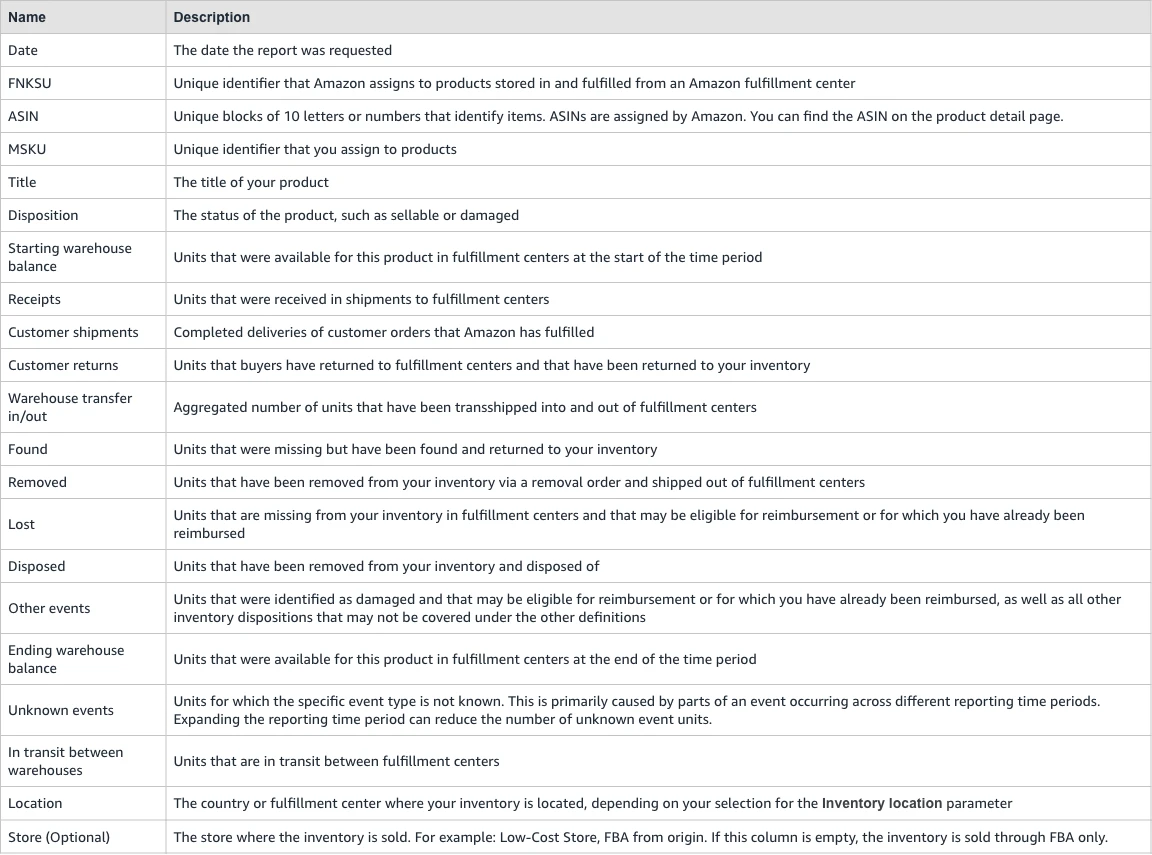 Amazon US public help documentation: Inventory Ledger summary-field definitions. Screenshot captured 2026-11-10; this is documentation, not a seller-account screen.
Do not make In transit between warehouses an extra receipt merely to force a warehouse balance to match. Keep that quantity visible as a separate position until you have established whether the comparison target includes it. A warehouse balance and a broader network total are different reconciliation targets.
In the detail file, preserve Event type, Quantity, Fulfillment center, Country, Disposition, Reason, Reference ID, and the event date. Amazon defines Reference ID as a transaction identifier, such as a shipment or adjustment ID. It defines Quantity as the transaction’s unit quantity. Together, those fields let you locate the actual movements behind a summary bucket.
Amazon also supplies Reconciled quantity and Unreconciled quantity for relevant adjustment events. These describe reconciliation status; they are not extra inventory receipts or deductions. Adding them to signed transaction quantities would count the same event twice.
If choosing and exporting reports is the unresolved step, use AMZFinder’s Seller Central inventory report guide. Start this workflow once you have the relevant Ledger views, rather than replacing the report-selection guide with another menu walkthrough.
Build a signed movement bridge
Use one consistent equation for each reconciliation group:
Expected ending warehouse balance = starting warehouse balance + net signed inventory movements.
Unexplained residual = reported ending warehouse balance − expected ending warehouse balance.
Build net movements from the detailed view’s signed quantities within the same FNSKU, location, disposition, and period. Keep increases positive and decreases negative. When mapping summary buckets, inspect how your file represents deductions: a negative shipment quantity is already a deduction. Subtracting it again reverses its effect.
Here is a hypothetical single-FNSKU warehouse example. All numbers are illustrative, not seller-account results. Assume there are no transfer or other-event movements in this example.
| Bridge item | Signed units | Running balance |
|---|---|---|
| Starting warehouse balance | 100 | 100 |
| Receipts | +40 | 140 |
| Customer shipments | −35 | 105 |
| Customer returns | +3 | 108 |
| Removal shipments | −4 | 104 |
| Lost adjustment | −2 | 102 |
| Found adjustment | +1 | 103 |
| Expected ending warehouse balance | — | 103 |
| Reported ending warehouse balance | — | 103 |
| Unexplained residual | — | 0 |
A zero residual means the movements explain the reported balance for that scope. It does not mean every lost-unit event is resolved or every reimbursement is correct. The lost and found rows remain available for their own follow-up even though the arithmetic closes.
Use detail to explain summary, not as a second inventory layer to add on top. After grouping detail events, compare the grouped totals with their corresponding summary buckets. If the bridge fails, find the first bucket that diverges before investigating every transaction individually.
Finally, compare adjacent periods under the same settings. A prior ending balance and the next starting balance should form a continuous bridge; if they do not, preserve both versions and inspect changed scope or refreshed events before inserting a manual adjustment.
Classify the residual before escalating
A reconciliation has two exception lists: unexplained arithmetic differences and explained events that still require action. Keeping them separate prevents a mathematically balanced ledger from hiding unresolved losses, and prevents a timing issue from being treated as a confirmed loss.
| Difference pattern | First check | Record as |
|---|---|---|
| Only one recent period fails | Summary availability and generation timestamps | Timing or refresh difference |
| One FC is down while another is up | Transfer events, counterpart location, and in-transit position | Location movement |
| Sellable falls while another disposition rises | Paired adjustment quantities and reasons | Disposition change |
| Unknown events straddle the boundary | Wider date window and related detail events | Boundary event pending explanation |
| Lost event has partial reconciliation | Reconciled/unreconciled quantities and linked outcome | Explained loss with outstanding follow-up |
| Event totals still do not explain the ending balance | Identifier mapping, duplicates, omitted event types, and scope | Unexplained residual |
Amazon’s US Ledger documentation, checked 2026-11-10, says adjustments often occur in pairs. Its example changes a unit from sellable to expired with a negative sellable adjustment and a positive expired adjustment. That is a decrease in one disposition, not necessarily a decrease in total units across dispositions. Investigate the unfulfillable side separately with the FBA unfulfillable inventory guide.
Likewise, a transfer can change an FC-level balance without proving that inventory left your ownership. Compare the relevant locations and any in-transit position, while keeping warehouse balances distinct from transit quantities. Do not expect every transfer pair to fall within the same reporting window.
For Unknown events, Amazon explicitly recommends expanding the reporting period because parts of an event can occur across periods. Expand the investigation window without silently changing the period you are closing: keep the original residual, then attach the outside-period counterpart as an explanation.
For adjustments involving misplaced, found, or fulfillment-center-damaged inventory, Amazon describes reconciliation links and reconciled/unreconciled quantities. Its documentation also notes that reconciliations can involve different SKUs, including substitution cases. If the direct FNSKU match fails, follow the actual reconciliation relationship rather than declaring an unmatched row solely because the identifier differs.
An expected-versus-received inbound shipment difference belongs in FBA shipment reconciliation. A confirmed adjustment requiring reimbursement follow-up belongs in the FBA reimbursement guide. Neither process is a substitute for explaining the period-end balance.
Keep a reconciliation worksheet that survives refreshes
Keep raw exports unchanged and work in a separate mapping sheet. Give each run a version and generation timestamp so a later refresh can be compared with the first close rather than overwriting its evidence.
Use three connected tabs:
- Balance bridge: one row per FNSKU, location, disposition, and period, with starting balance, each movement bucket, expected ending balance, reported ending balance, and residual.
- Event register: original event date, identifiers, location, disposition, event type, signed quantity, reason, reference ID, and source filename. Retain reconciliation-status columns without adding them to movement totals.
- Exception register: difference category, affected quantity, supporting event references, explanation, owner, next action, and status.
Do not remove rows merely because they look repetitive. An export assembled twice may contain duplicated events, but two events can also share a date and quantity legitimately. Compare the full event context and source files before excluding a row, and retain an exclusion note that explains the decision.
A useful exception note is specific: “FC-level transfer out has a counterpart outside the close window; retained as a timing item.” “Inventory mismatch” tells the next person almost nothing. Include the counterpart reference, date, and quantity when available.
Separate units from money throughout. A reimbursement payment is a financial outcome; it is not a physical receipt to insert into your warehouse bridge. Amazon’s documentation, checked 2026-11-10, says online reconciliation links can lead either to another adjustment or to a reimbursement transaction. Record which outcome explains the event, then reconcile the financial amount separately.
Before signing off, confirm that the summary and detail versions are recorded, every movement category has been considered, and each nonzero residual has an owner. A balanced total with unexplained offsetting rows deserves investigation too: one omitted receipt and one omitted shipment can cancel numerically while leaving both transactions unmapped.
Frequently Asked Questions
Is Inventory Ledger ending balance the same as sellable stock?
Not necessarily. Amazon’s US documentation, checked 2026-11-10, organizes Ledger history by disposition and defines disposition as physical state, not availability to pick, pack, or ship. Match the same stock population before comparing a Ledger balance with a current availability figure.
Does an unreconciled quantity automatically mean money is owed?
No. Amazon defines it as units not yet reconciled with other adjustment events. The relevant event, its reconciliation outcome, and the applicable reimbursement policy determine the follow-up. It is not a payment amount or a second deduction from stock.
What if the monthly summary and recent detail disagree?
Check availability and report-generation times first. Amazon’s documented monthly summary cadence, checked 2026-11-10, generally makes the previous month’s data available by the end of the second day. Re-run comparable versions, then inspect boundary events rather than forcing the difference into Other events.
Should I reconcile by ASIN or FNSKU?
Start with FNSKU, as Amazon recommends in its Ledger documentation checked 2026-11-10, and retain ASIN and merchant SKU for cross-reference. For a reconciliation explicitly linked to another SKU, preserve that documented connection instead of merging all inventory under the ASIN automatically.
Close the period with an exception list
The deliverable is a balance bridge plus a traceable explanation for what remains open. Keep physical movements, reconciliation status, and financial outcomes in separate columns. Close the arithmetic when it is supported, and carry unresolved events forward with their references intact. That gives the next reconciliation a usable starting point instead of another unexplained adjustment.